AT&T Announces LTE Plans for St. Louis & other cities

In a press release this morning AT&T has announced their plans to rollout 4G LTE (long term evolution) in the St. Louis area as early as next month (April 2012). The press release states that the rollout to St. Louis and the other cities announced, “are scheduled for April, May and into early summer.” LTE is only currently available in St. Louis through Verizon.

What does LTE mean for you? It means extremely fast data connections on your compatible mobile device. How fast? Well we won’t know exactly until it is rolled out but other areas have seen speeds ranging from 15-65 Mbps download. If you’re still scratching your head let me give you a comparison, I currently have 12 Mbps download on my home internet connection.

LTE is only supported on certain devices including the upcoming Nokia Lumia 900 and HTC Titan II Windows Phones, which are both also rumored to be released on AT&T in the coming months. There are also many Android devices that support LTE. The only Apple device that currently supports LTE is the newly announced third generation iPad.

AT&T has provided a video that provides further detail about LTE.

See the full press release below.

AT&T 4G LTE COMING SOON TO ST. LOUIS

More customers can look forward to ultra-fast mobile Internet on the latest LTE devices

St. Louis, MO, March 12, 2012 AT&T* plans to roll out 4G LTE in St. Louis soon, bringing customers the latest generation of wireless network technology and faster mobile Internet speeds.

St. Louis customers will see several benefits from AT&T 4G LTE, including:

· Faster speeds. LTE technology is capable of delivering mobile Internet speeds up to 10 times faster than 3G. Customers will be able to stream, download, upload and game faster than ever before.

· Cool new devices. AT&T offers several LTE-compatible devices, including new AT&T 4G LTE smartphones and tablets, such as the Samsung Galaxy Note™, HTC One X, and Pantech Element™ tablet.

· Faster response time. LTE technology offers lower latency, or the processing time it takes to move data through a network, such as how long it takes to start downloading a webpage or file once you’ve sent the request. Lower latency helps to improve services like mobile gaming, two-way video calling and telemedicine.

· More efficient use of spectrum. Wireless spectrum is a finite resource, and LTE uses spectrum more efficiently than other technologies, creating more space to carry data traffic and services and to deliver a better network experience.

“AT&T customers in St. Louis can look forward to even faster mobile Internet speeds very soon, on our leading lineup of smartphones and devices,” said Nancy Garvey, AT&T’s vice president and general manager for the Greater Midwest Region. “We’re excited to bring St. Louis all that 4G LTE has to offer. Our teams will be working hard across the city toward our upcoming launch.”

AT&T’s 4G Network

In addition to St. Louis, AT&T 4G LTE is also coming to Naples, Fla; Bloomington, Lafayette and Muncie, Ind.; Baton Rouge and New Orleans, La.; Akron, Canton and Cleveland, Ohio; Bryan-College Station, Texas; and Staten Island in New York City. These launches are scheduled for April, May and into the early summer.

AT&T customers have access to the nation’s largest 4G network, covering nearly 250 million people. Even as 4G LTE expands, AT&T customers are able to enjoy widespread, ultra-fast and consistent 4G speeds on their compatible device as they move in and out of LTE areas. AT&T has two 4G networks that work together for customers, LTE and HSPA+ with enhanced backhaul. With other carriers, when you travel outside of their LTE coverage area, you’re on a much slower 3G network.
 

Sources: AT&T, Nokia, HTC, Androidandme, YouTube, Verizon

Tagged with: , , , ,
Posted in Gadgets, Hardware, Mobile, Network, Nokia

HTC Titan

The first thing that will stand out when you see an HTC Titan in person is its size. It is big, but not uncomfortably so. This 4.7 inch Windows Phone 7.5 (Mango) device that runs on AT&T’s network fits comfortably in the hand and in the pocket. Since it runs the current Windows Phone 7.5 operating system and gets all the benefits of doing so (battery life, usability) I will focus on what Makes the Titan unique.

If you’d like to find out more about the Windows Phone operating system the Windows Phone site is a great resource.

Hardware

The HTC Titan has a solid feel. It has a heft when compared to the Samsung Focus, my comparison device, but it is not heavy. The case has a soft texture to it and the screen actually sits inside the case so when you pop the back of the case off it seems the screen is actually falling out (see slideshow). It’s a pretty cool design.

The camera on the back is a 8 MP camera with dual LED flash. It takes nice pictures, and with the additional camera software HTC has included, makes this one of the most powerful cameras in the Windows Phone lineup. There is also a 1.3 MP front facing camera, which is another aspect that sets this Windows Phone apart from the others. In the camera itself the front facing camera can be accessed by tapping an additional software button located between the zoom and button to switch to video.  I was able to try the just released Skype for Windows Phone beta with the Titan and results were good.

The 4.7 WVGA screen doesn’t produce the same quality of color as the Samsung Focus OLED display, but have no doubt this screen looks very good. The extra size of this screen really makes the Windows Phone live tiles seem even more engaging than normal. Even if you aren’t in the market for a new phone at the moment you owe it to yourself to check out the screen on the Titan in person if possible.

If you noticed I didn’t mention processor or memory specs above that was intentional. If you’ve used Windows Phone across a variety of devices you know that the fluidness of the operating systems is consistent whether you’re using current hardware or a device that cam out in October 2010. The HTC Titan is obviously no different. If you are really interested processor specs are listed in the specifications below.

From a battery life perspective I also saw similar results as other Windows Phones. You can easily get through a day with normal use. Call quality and data speeds were very good.

HTC Software

It’s well known manufacturers have some level of customization within the Windows Phone operating system and to date HTC has shown the best example of what can be done.

HTC has expanded the camera and settings of the Windows Phone 7.5 operating system (OS) on the Titan to really make it stand apart.

In the camera HTC has added support for additional camera modes and settings right into the camera settings menu. They have also added additional settings in the system settings area. A complete list of these are provided below.

CAMERA SETTINGS

  • face detection
  • metering mode
  • flicker adjustment
  • scenes
  • effects
  • panorama shot – it is nice that HTC built this into the OS, but I have seen better results using a 3rd party app such as the Photo Studio provided by Samsung
  • burst shots – works well to capture many images in a short amount of time

SYSTEM SETTINGS

  • Internet Sharing – the Titan can act as a wireless hotspot if you are using the 5GB data plan from AT&T
  • SIM Applications
  • SRS Enhancements (for sound and video) – when using wired headset
  • Hearing Aid support
  • Attentive Phone
    • Quiet ring on pickup – reduces ring volume when I move phone
    • Pocket mode – increase ring volume while in pocket or bag
    • Flip for speaker – turn over your phone to activate the speaker during calls
    • Flip for mute ringer – turn over your phone to silence the ringer during an incoming call

Although HTC has done a wonderful job of including many additional features into the Windows Phone operating system itself they also have unique apps available in the marketplace. One such app was the DLNA app. It worked perfectly with my Samsung DLNA TV (my Samsung Focus still doesn’t support DLNA).

Overview

The Windows Phone 7.5 (Mango) operating system is great, and in the right hands can be made even better. HTC has stepped up to the plate and hit a home run with the Titan. The combination of 2nd generation hardware with additional operating system features sets this device apart from the pack. Many other sites have claimed the Titan is currently the best Windows Phone currently available. I can’t say it is the best as I haven’t been fortunate to try all of the other devices. Although, I have tired many and the Titan is definitely a very good device and probably the best combination of hardware/ software currently available in the Windows Phone ecosystem.


As of the time of this writing the Titan is currently available on AT&T’s website for $.01 with a 2 year contract. If you’re in the market, please consider it.

MWGEEK RECOMMENDED

Specifications

  • 4.7” WVGA screen
  • Rear facing camera (8MP) with dual LED flash
  • Front facing camera (1.3MP)
  • Battery – 1650 mAh with up to 4 hour talk time and 14 day standby
  • Weight – 5.64 ounces
  • Size – 5.14 x 2.78 x .39 inches
  • up to 16 GB internal storage
  • Wi-Fi
  • GSM/EDGE
    • 850/900/1800/1900 MHz
  • 3G UMTS/HSDPA
    • 850/1900/2100 MHz
  • Bluetooth 2.1 + EDR with A2DP stereo
  • 4G HSPA+ with enhanced backhaul


Disclaimer


I am an AT&T mobile and UVerse internet customer. AT&T is not compensating me for this review. My opinions expressed above represent my true thoughts.


Sources: AT&T, Microsoft

Tagged with: , ,
Posted in Apps, Gadgets, Hardware

Skype for Windows Phone: Beta Released

Joe Belfiore tweeted early this morning about the availability of a Skype beta for Windows Phone. Obviously this news is spreading fast so I had to try it out on the HTC Titan I’m currently reviewing (as it has a front facing camera). My first impressions are below. If you want to download the Skype Beta for yourself follow the link HERE.


Initial Impressions

I tested this between a Windows 7 PC and an HTC Titan. Call and video quality was very good. The front facing camera on the Titan produced video on par with my Microsoft LifeCam. The video went full screen and there was a small window in the corner of the screen to preview your own picture. I did not tie a mobile number to the Skype on mobile so the phone could only receive call when I was actually in the Skype app, I think we’ll see the ability to receive calls whether the app is open or not in the future. I did not see a way to add contacts while in the application, but beyond that the interface is straightforward and easy enough to use. Some may find the lack of names underneath the icons, like on the typical application bar, a non user friendly feature, but the icons are common enough that you know the phone icons answers and hangs up calls. We were clamoring for it and now its here (in beta) but it works and the possibilities moving forward are nearly endless.

While in a Skype call

  • add video
    • brings up a “turn camera on” feature
    • switch camera – switches camera from front to back (it is yet to be seen whether phones with only a rear camera can do video)
    • bring up FFC
    • allows for camera off
    • mute
    • swipe to chat
    • swipe to profile
  • mute
  • go speakerphone
  • bring up dial pad
  • end call
  • swipe to chat window
  • swipe to profile

Sources: Twitter

Tagged with: , ,
Posted in Apps, Microsoft, Mobile

Windows Phone Tango Confirmed

As of today Microsoft is releasing a preview of their Windows Phone SDK which allows for devices running as low as 256mb of memory. This is to help spread growth in 23 additional markets including, “Bahrain, Bulgaria, China, Costa Rica, Croatia, Estonia, Iceland, Iraq, Israel, Kazakhstan, Latvia, Lithuania, Qatar, Romania, Saudi Arabia, Slovakia, Slovenia, Thailand, Turkey, UAE, Ukraine, Venezuela and Vietnam. “ The Nokia Lumia 610, a budget device with 256mb was also announced. We’ll have more, including what the 256mb threshold means for existing apps, in the near future.

Source: The Windows Phone Developer Blog

Tagged with: , , ,
Posted in Development, Gadgets, Hardware, Microsoft, Nokia

What does Windows Phone look like?

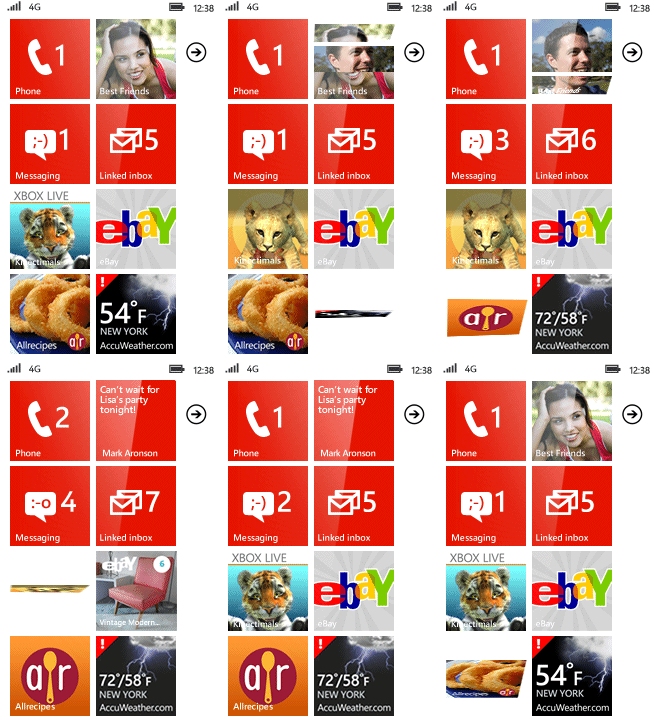
The Windows Phone Blog recently posted an animated GIF representation of Windows Phone 7.5 start screen. If you haven’t seen what live tiles look like check it out.

4532_WP_LiveTiles_Animation_screen_thumb_43F48F80

Tagged with:
Posted in Microsoft, Mobile

AT&T Mobile Hotspot Elevate 4G

Performance/Battery Life:

Having never used a wireless hotspot my interests lay in a few areas: Speed, Performance and Battery Life.

Connecting to the hotspot was surprisingly simple. It lists the SSID (network name) and password on its display. Since the SSID is shared it shows up as an available network on both computers and devices. You simply enter the password and connect.

My stress test for the device was to stream as much video on a HSPA+ “4G” connection as I could without negatively effecting the quality of the stream. For the record LTE 4G, the fastest wireless connection the device supports , is not available in my area.

In this test I streamed a movie from Netflix to my Samsung Focus and television episodes from Hulu to my ASUS 1005HA netbook. Surprisingly, both streams had minimal buffering and very good performance easily comparable with my home internet connection. When I first connected the 2nd device the hotspot restarted on its own, but picked back up within minutes. This happened only one other time while testing the device on a different day. I added an 3rd device to the mix, an additional PC streaming YouTube content. Doing this caused buffering that became a little annoying, approximately once every 5 minutes. I decided to remove the third device after about 20 minutes to see if streaming quality remained high as it did before. It did.

During this test I streamed 1GB of data in a matter of 3 hours and 22 minutes before the battery on the hotspot gave out. Keep in mind streaming 2 video feeds to 2 devices for over three hours is not a normal use case.

The likelihood of you exceeding your data cap is also minimized by the fact the display shows your current total data usage on its screen (see photos).

Speed:

Test

Bars

Download Speed

Upload Speed

Latency

Jitter

Notes

FCC Consumer Broadband Test Full 4G (HSPA+) 7314 kbps 1692 kbps 78 ms 22 ms In a very good coverage area
DSL Reports 2 Bars 4G (HSPA+) 1681 kbps 197 kbps 57 ms n/a A spotty area sometimes dropping to EDGE
DSL Reports 2 Bars 4G (HSPA+) 972 kbps 185 kbps 57 ms n/a A spotty area sometimes dropping to EDGE

Data Plan:

The only current data plan available for hotspots is the 5 GB plan which is currently available for $50 per month.

The device itself is $69.99 with a two year contract and $269.99 with no commitment.

Overview:

I enjoyed my time with the Mobile Hotspot Elevate 4G. The device is a nice size, somewhat solid feeling, with a soft rubber case. Connecting to the device was simple. Connections took little time and besides the 2 random reboots mentioned above, were reliable. I was very impressed with the speeds over HSPA+. I wish I could have had the chance to test it over 4G LTE. Battery life was good, given my stress test, yet I wasn’t sure if it could meet the 5 hours listed in the specifications. Charging is accomplished via a micro usb cable and the device also has a button lock and 2 external antennae connectors. The 1800 mAh battery is removable so you could easily carry around a spare for extended time. My overall impression with the hotspot was positive and I believe the device would serve anyone looking to connect multiple devices on the go, assuming you are in an AT&T coverage area.

MWGEEK RECOMMENDED

Specifications:

Battery

  • Capacity
    • 1800 mAh Lithium Ion
  • Use time
    • Up to 5 hours

Dimensions

  • Size (inches)
    • 3.8 x 2.2 x 0.7 inches
  • Weight
    • 3.6 ounces

Memory

  • Expandable memory storage up to 32 GB
  • Memory format microSD

Wireless Technology

  • GSM/GPRS/EDGE
    • 850/900/1800/1900 MHz
  • 3G
    • HSDPA, 850/1900/2100 MHz
  • 4G LTE Speeds
    • 4G speeds delivered by HSPA+ (with enhanced backhaul) or LTE, where available

Display

  • Display size
    • 1.77 inches
  • Resolution
    • 160×128 pixels
  • Colors
    • Color LCD

DISCLAIMER:

I am an AT&T mobile and UVerse internet customer. AT&T is not compensating me for this review. My opinions expressed above represent my true thoughts.

Tagged with: , ,
Posted in Gadgets, Hardware

Upcoming Device Reviews

It’s an exciting time at MWGEEK. Very soon we will start posting device reviews. There will be a variety of mobile focused devices. Stay tuned!

Posted in Gadgets, Hardware

Windows Live Passwords: A Lesson in Security and Frustration

I have learned the hard way how important a good password management plan is. My windows live account is easily my most used account. I have had it hacked once and ever since then I’ve taken care to carefully follow my password management plan. That plan includes using password management tools (such as KeePass) and using complex, unique and expiring passwords across services. Since implementing that process with Windows Live I’ve realized the password expiration and reset process for Live accounts is broken.

No warnings

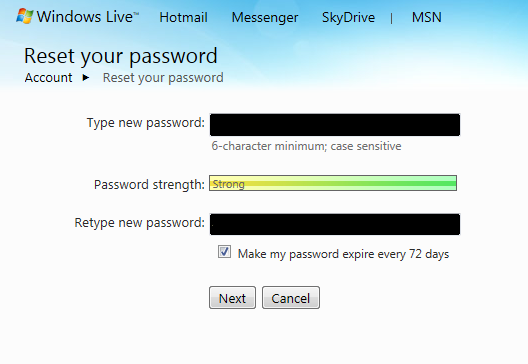
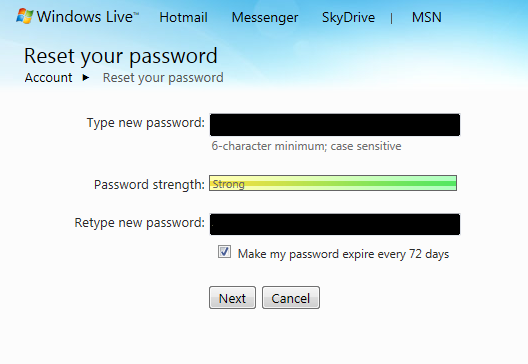
This all started with me making the conscious decision to implement expiring passwords in Windows Live. That all started with checking the “Make my password expire…” checkbox.

pwchk

You would think doing this would result in friendly reminders a few days before the expiration date that your password is expiring, right? WRONG. Unlike expiring Windows passwords, expiring Live passwords are really not handled at all as far as I can tell. Sites that have implemented Windows Live logon start providing you with non helpful errors when trying to access live services.

Inconsistent messages

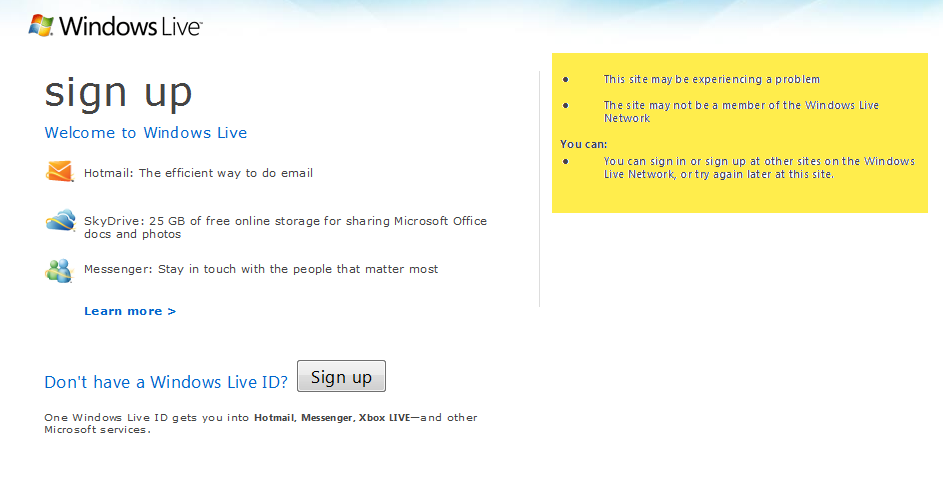
When trying to sign into Hotmail via the web you’ll get a “This site may be experiencing a problem”

pwerror

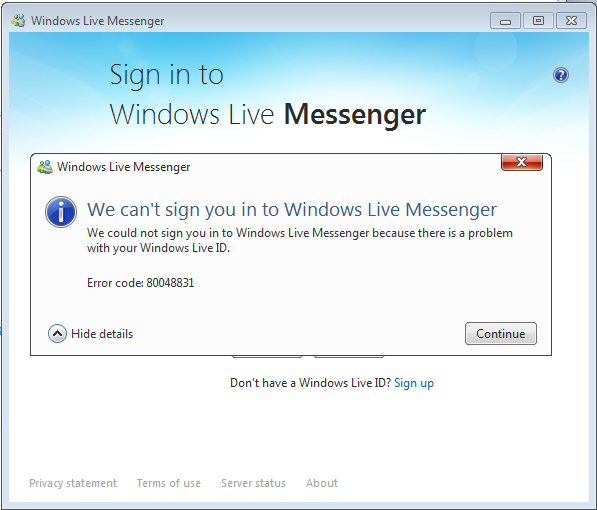
When trying to sign into Windows Live Messenger you get a “…there is a problem with your Windows Live ID.”

wlmerror

As you can see the messages are inconsistent and are even worse on devices like the XBOX 360 and Windows Phone.

Broken process

So let’s say you’ve been through this headache a few times before, if you knew what the problem was you’d be able to change your password easily right? WRONG.

If you try to logon to a site like https://account.live.com to change the password in this instance you get the same error as you got when trying to logon to Hotmail via the web.

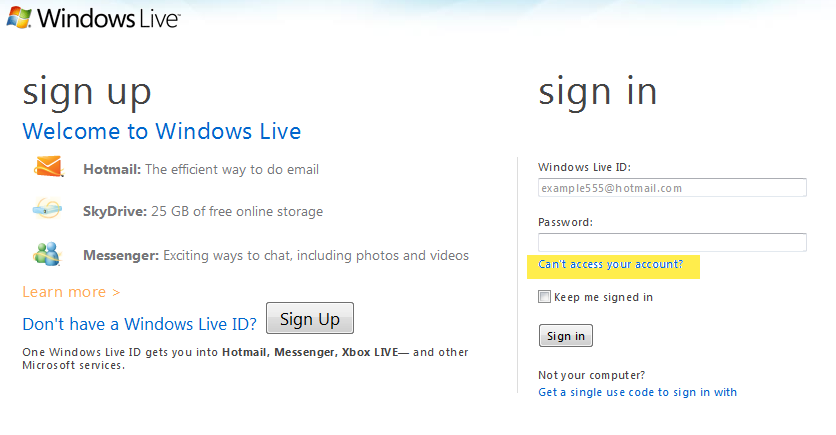
You have to find your way back to the Windows Live logon page and click the “Can’t access your account?” link.

cantaccess

Yet that is no easy feat either, especially if you’ve ever told Live to remember your logon information. It normally takes a series of cache clearing and IE restarts and sometimes even Windows restarts to get to that point.

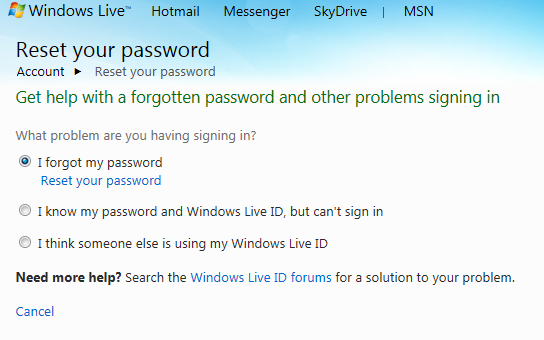
So after you do get to that point there would be a choice that says “My password has expired” right? WRONG.

You have to select “I forgot my password.” Which in my case isn’t true at all. The other two options don’t get you anywhere close to where you need to be and normally result in the same incorrect errors as above.forgot

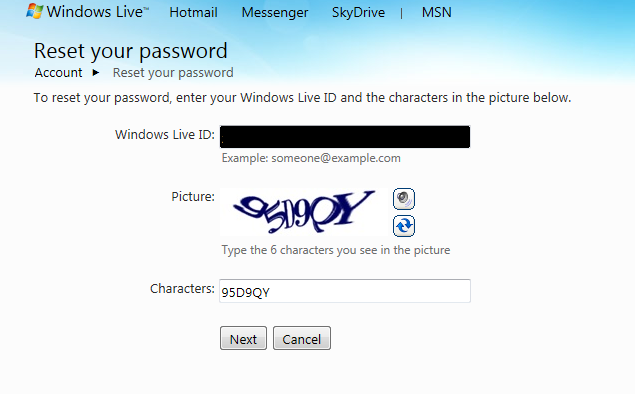
This takes you through a CAPTIA…

captia

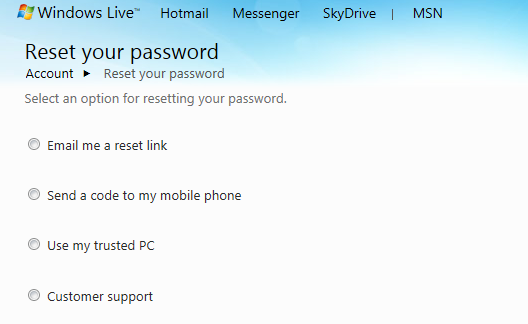
and then a reset using one of four options.

resetoptions

At that point you’re finally back to where we all started. Selecting your password and deciding whether to check the “Make my password expire…” checkbox.

pwchk

For me the answer is to always check it; but do you think a normal person would ever go through this again?

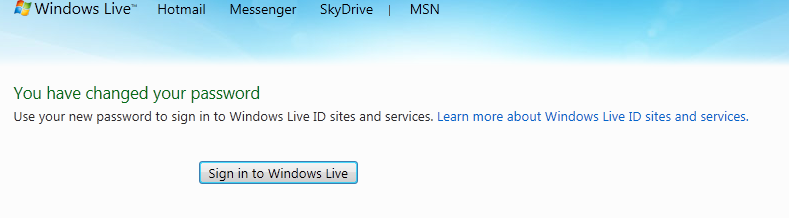
success

Microsoft… fix this.

A normal person is the one who most needs to be persuaded to engage in good password management practices yet the lack of process and common sense you must go through with Live passwords is a HUGE barrier to entry.

Let’s face it a lot of things need to be fixed here. Yet, the first on this list would probably have the most impact. Just do password expiration reminders like Windows does.

  1. You should be reminded your password is about to expire across any device or website that uses the Live logon
  2. If your password has expired the messages should be clear and consistent across any device or website that uses the Live logon
  3. Resetting an expired password should be an option. I didn’t “forget”

Microsoft, to provide a consumer focused service you must have consumer focused processes. This is obviously not the case here. You can do better, and I, as an avid user, expect you to.

Tagged with: , ,
Posted in Live, Microsoft

St. Louis Windows Phone Inner Circle Event

On October 24th, Brian Seitz announced on the Windows Phone Blog that an event called the Windows Phone Inner Circle would be coming to multiple cities in the United States. I was happy to see many smaller markets including places like St. Louis and Nashville.

MWGEEK is based in St. Louis, so there was no question we would attend. The event was held at the Malt House Cellar in St. Louis on 11/10/2011. It was a nice relaxing venue. I had expected these events to be like a typical tech conference with rows of chairs and PowerPoint presentations. Instead it was much more relaxed and personable. The only presentations were some videos of the new features of Windows Phone 7.5 (Mango) running on the TV’s around the venue. The only presentation is when one of the Microsoft folks would take the microphone and announce winners and thank us for coming. It wasn’t a sales pitch, the phones sold themselves, and that was evident by the reaction of those there who didn’t have Windows Phones already.

There were also members of the Windows Phone team available who would talk to you about the phones, your current experiences, and perhaps most important of all feature suggestions. I had some really interesting conversations with a few of those guys.

Many 7.5 phones such as the HTC Titan, HTC Radar and Samsung Focus S were on display also. There were international only devices such as the very cool Fujitsu Toshiba waterproof phone with a 13 MP camera, I really believe this phone would do great in the states. Unofficially there were a few Nokia Lumia 800 devices that were well hidden in pockets, but they came out from time to time. That really is a sharp device. 

Giveaways consisted of phones (the HTC Titan and Samsung Focus S), XBOX live games and skateboard decks.

Overall it was a great event style at a great place with great people. I really hope to see more Microsoft events in the St. Louis area. The turnout surprised me honestly, and I hope it did the Microsoft folks as well. Check out the pictures below and go get in line for one of the new Windows Phones!


Source: Windows Phone Blog

Tagged with: , , ,
Posted in Hardware, Microsoft, Mobile, Nokia

First Nokia Windows Phones Officially Announced

Well Nokia lived up to their promise by having Windows Phones out by the end of the year. They did so via the announcement today of the Lumia 800 and Lumia 710. These will only be released overseas by year end. Reviews around the web so far are positive.

I’m excited that the Windows Phone ecosystem continues to grow with a range of hardware. But, all I can think is that by the time they start releasing Nokia Windows Phones to the U.S. we’ll probably be looking at a “Lumia 850” with a front facing camera, NFC, LTE, etc. That non-existent device could definitely be a contender to replace my Focus when the time comes. I just think for Nokia to really wow the U.S. market again that they’d blow our socks off with every bell and whistle imaginable. (Notice i didn’t mention dual cores, I love my battery life and current speedy 1st gen Windows Phone).

Good job Nokia and Microsoft. I’m sure this is just a small taste of what is to come.

Find out more about both devices here.

Source: Windows Phone Blog

Tagged with: , ,
Posted in Hardware, Microsoft, Mobile, Nokia