St. Louis Area Windows Phone Twitter List

I’ve started a twitter list bringing together folks in the St. Louis area or Midwest that are Windows Phone influencers.

A link to the list is at https://twitter.com/mwgeek/stlwindowsphone

If you know of others that should be added please contact us.

Tagged with: , ,
Posted in Community, Mobile

First St. Louis Windows Phone Meet Up A Success

Today I joined other Windows Phone enthusiasts in St. Louis at Triumph to talk Windows Phone. I apologize to the group for not doing more than a single tweet to promote the event.  There was a wide array of devices including unlocked first gen phones to freshly updated Lumia 900’s in both cyan and black.

Yes, there was quite a bit of nerdy conversation, but everyone was a joy to meet and shared a genuine interest and love for Microsoft’s mobile OS. Developer’s talked about their apps, which will be linked on our “Support Midwest Developers” page.

If you missed the meet up don’t worry there will be future events planned. The best way to stay on top of the schedule is to sign up to the group via this link.

I’m excited to see how this group grows in the future. It was great to meet everyone!

Tagged with: , ,
Posted in Community, Microsoft, Mobile

Nokia Lumia 900 Data Connectivity Fix/Update Available Now–4/13

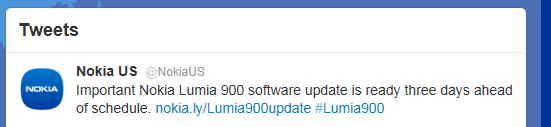
Nokia just tweeted via their @NokiaUS twitter handle that the update is available now (4/13), 3 days ahead of schedule. To get your update simply plug your Lumia 900 into a PC running the Zune software and you will be informed of the update. For Nokia’s official statement about the fix check out this page.


image

Source: Twitter, Nokia

Tagged with: , , , ,
Posted in Gadgets, Microsoft, Mobile, Network, Nokia, software

Get a Nokia Lumia 900 Windows Phone For Free!!!

Two days after the launch of the Lumia 900, Nokia acknowledged what some early adopters were experiencing, a glitch that could cause the data connection to drop unexpectedly. Bad news right? Maybe not.

Within hours Nokia posted the following not only acknowledging the issue but confirming a software fix coming in the next week and giving anyone who purchased a Lumia from launch until April 21 a $100 credit on their AT&T bill. Given upgrade pricing for the Lumia is $99 you actually can come out on this deal with a very high end LTE device and an extra dollar. Give credit to Nokia for handling this issue very well, this is no iPhone antennae-gate that is for sure.

Granted we haven’t yet posted our detailed review of the Lumia yet, but have no doubt this is an extremely nice phone and is considered the “hero” Windows Phone. If you’re in the market for a new device get to an AT&T store today and check out the Lumia 900 for yourself so you can take advantage of this offer.

Source: Nokia

Tagged with: , ,
Posted in Gadgets, Microsoft, Nokia

AT&T Launches LTE Network in St. Louis alongside LTE Windows Phones

On April 10, 2012 AT&T customers were able to access AT&T’s 4G LTE network in St. Louis. Coincidentally this was right alongside the launch of the newest LTE phones on AT&T, the Nokia Lumia 900 and the HTC Titan II. Both of these devices launched on April 8 and are running the Windows Phone OS.

AT&T recently announced that they were going to bring LTE to the St. Louis market and they delivered on that promise. What does LTE mean to consumers? On my personal Nokia Lumia 900 I tested LTE data speeds of 14 MB download and 3 MB upload. That is quite impressive especially considering my home internet connection is only 12 MB down. You can see if LTE is available to you by checking the coverage area at www.att.com/network.

Although, we will have a much more detailed look at the Lumia 900 in the coming days I’ll leave you with the following videos focusing on the AT&T LTE Strategy and the Lumia 900.

Tagged with: , , ,
Posted in Gadgets, Hardware, Network, Nokia

Nokia & Microsoft built a Time Machine

To celebrate the launch of the Lumia 900 Nokia and Microsoft had a “Free Time Machine” event in select cities to show how you can take advantage of the time Windows Phone saves you. Don’t fret if you’re not in New York, Chicago or San Francisco, you can partake in the fun by navigating to www.freetimemachine.com and take the chance on winning some great prizes, including a trip to Hawaii. Check it out.


Source: FreeTimeMachine

Tagged with: ,
Posted in Microsoft, Mobile, Nokia

Graffiti–Windows Phone Draw Something Clone

No this isn’t an announcement that Draw Something is out on Windows Phone. That hasn’t happened…yet. But, as usual the development community and stepped up and created an app called “Graffiti”. It’s version 1 and has some bugs, but it’s fun and it’s free.


Check it out for yourself here.

Tagged with: , ,
Posted in Apps

Apps? Windows Phone Has Them

This post is to make you aware of two new pages on mwgeek.


Want to find apps that are made by developers in the Midwest or focus on our area? I’ve linked to some of the best that on our Support Midwest Developers page. Please contact us if there are others that should be highlighted.


Some try to argue Windows Phone is missing key apps. See our list of commonly overlooked popular apps or alternatives.


Both of these pages will be updated over time.

Tagged with: , , ,
Posted in Apps

St. Louis Post Dispatch Launches a Windows Phone App


Incredibly customizable, the amazingly speedy and full featured initial version of the STL Post Dispatch Windows Phone app may be the best news app I’ve ever used.

Firstly, let me start by saying the app is incredibly speedy. Within seconds of opening the app for the first time the panorama control loads with content and its background is displaying a picture from a recent story. USA Today could take lessons on load times. The app looks good whether you’re using a light or dark theme, but I prefer the dark. This is no simple rss or news reader.

I mentioned the front page is customizable, and that isn’t limited to just headings like “news’ and “sports”. You can select individual sports teams ranging from the local college teams to professional teams. Every section of the newspaper is there to choose from. You can even add individual twitter streams from the Post Dispatch writers on the front page. You can pin most of the individual sections I mentioned above to the Windows Phone start screen as secondary live tiles. For instance I pinned the “music” section and found a story about upcoming Lou Fest artists.

What’s refreshing is that the majority of this content is handled within the app, it doesn’t just kick you off to a mobile version of a website. This includes the twitter feeds. There are instances where you are sent to a mobile site, for classifieds and live chats for instance, yet those seems to be far and few between.

The app also features a “send to post-dispatch” feature which allows you to tip the Post-Dispatch on breaking news. This feature brings up the standard “send from” dialogue box allowing you send an email from your email accounts that are set up on the phone. When you’re within a story you have the normal options seen in most news apps: share, save, previous, next. But this app implements Facebook and Twitter sharing better than any I have ever used. They use the rarely used “post a link” OS hook, allowing you to post to the social accounts you have set up on your phone like you would when posting from your “Me” tile, rather than kicking you off to a mobile website that makes you re-authenticate to Facebook or Twitter. This may seem minor, but it’s a drastic improvement in experience and it’s really great to see an app implement it right.

It does not appear the app’s main live tile is enabled with real time content yet, but the secondary live tiles are. The music tile I pinned previously started showing artist pictures within a few minutes. That seems to be the only oversight in this otherwise amazing app.

It is incredibly refreshing to see a local entity such as the Post Dispatch support Windows Phone and even better knock it out of the park on their first try. This is EASILY the best way to enjoy the post dispatch content. I doubt I’ll ever actively go to their website again. I’m interested to see what improvements future versions bring. Download the STL Post Dispatch app today on the Windows Phone Marketplace.


MWGEEK RECOMMENDED
Tagged with: , , ,
Posted in Apps

Jawbone Jambox Review

Features

  • Bluetooth
  • 3.5 mm stereo
  • USB
  • Built in Microphone
  • Talk button
  • Volume Buttons (-/+)
  • LED Power button
    • flashes red when battery is low
    • white when fully charged
  • Battery Life
    • talk button – spoken remaining battery
    • LED Ring
  • Speakerphone
  • 3.5mm cable, short usb cable, long usb cable


Sound Quality

  • Music – excellent bass
  • Voice – distortion at loud volumes


Overview

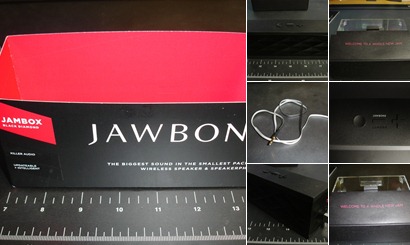
The Jawbone Jambox is an interesting product. I listened to hours of music and audiobooks on it via both the Bluetooth and wired (3.5mm connection). I have spent time with small, normally wall powered, speakers in the past, but none have come close to the features or the sound quality of this little device. The Jambox is heavier than you’d imagine given the size and I think that helps account for the excellent bass this speaker puts out. Music sounded great normally, although at max volume there was some distortion. Audiobooks sounded great at normal volume but voices got a bit “tinny” at max volume. To be fair you don’t need the device at max volume for music or voice in a normal setting.

The Jambox also acts as a speakerphone. When hooked up via Bluetooth it acts like a normal Bluetooth headset and conversation quality is as good as business level speakerphones I have used.

I’ll admit I was initially confused on the volume controls. When I looked at the buttons I immediately thought of a video game controlled D-Pad and select button. I assumed, incorrectly, that pressing a different direction on the D-pad would change some separate setting. When I finally read the manual I found the device is much simpler than that. The buttons are actually a minus (-) and a plus (+) for volume decrease and increase. Pressing the circular button will help initiate calls or give you information on remaining battery (via a spoken voice).

I used the device over the course of a few days in what I would consider normal use, a few hours each day, and the battery lasted much longer than I thought. When it was near dead it spoke to me, literally, and told me the battery needed charging. Neat. Supposedly the device is upgradable via the internet, so who knows what else it could say to you in the future. Power on the device is handled by an led switch on the side near the usb port. It glows white when fully charged and is red when the battery needs a charge.

I could see the Jambox as the perfect companion for someone who may work at home and needs a speakerphone for calls and a speaker to listen to audio and  if it wasn’t for the price. It is currently listed at $199 on the AT&T website. As good as it is you could find an equivalent device that was wired for much less, or just use the speakers on your cell phone. If the price isn’t an obstacle, I’d recommend giving the Jambox a serious look.


MWGEEK RECOMMENDATION: MAYBE, IT’S PRICEY


Specifications

  • Battery Life – about 10 hours
  • Power – 2W x 2 <.1% THD
  • Output – 85 dB @ 0.5m
  • Frequency – 60Hz – 20 kHz
  • AC Adapter – 5V 550 mA Max 2.5W
  • Dimensions – 151mm x 57mm x 40mm
  • Weight – 347g (12 oz.)
  • Bluetooth Range – 33ft (10m)


Sources: AT&T

Tagged with: , , ,
Posted in Gadgets